MTL v2.7d

Ableton Layout Quick Guide
Version v2.7d is 100% compatible with Ableton 7. for Ableton 8.x use new MTL 3.x

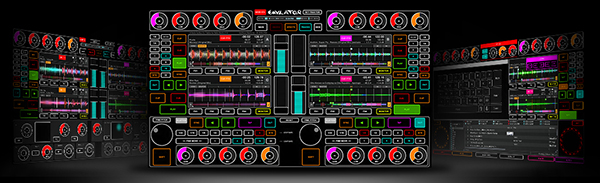
This is the master screen of the layout for Ableton Live
This layout have multiple sliders, buttons and knobs for take full controll of 6 TRACKS, in the near future this layout include more channels.
MonoTouchLive provide ableton template with all MIDI objects already maped and is optimized for use with this Ableton layout.
MonoTouchLive is MIDI controller, you can remap any slider, button , knob or pad to any different control inside ableton.

1- Track Control:

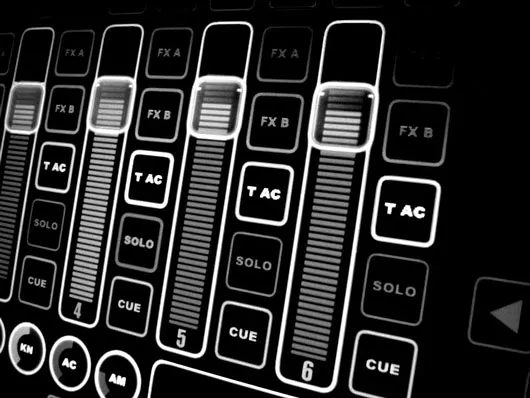
STOP: button for stop clip on track.

PLAY:
button for play clip on track, this button have visual feedback for show the staus of clip.

K HI, K MI, K LO:
buttons, kill HI, MID and Low frequencys, for faster multiple frequency kill you can drag your finger over this buttons.

FX:
this buttons shoot effects, every track have 4 buttons, you can switch this buttons pressing button FX , located ath the lower right in main screen.
T AC: this is track activator button, yu cna mute the track with this.

SOLO: this button put track in solo mode.

CUE: button for monitor audio in your headphones.

SLIDER: volume level slider, this slider have special feature called atraction (AT) with atraction you can touch any part of the slider,  the knob move to that position, with this feature you no need drag the slider knob for move the knob  to specific position, the speed of atraction can be customized.

Every track have buttons called CH labeled with number of track, example

CH 1

If you press any of this buttons,another section of track controll is showed:
Redwin and Forward buttons.
ST L / EN L: this buttons are markers for define the  loop lenght and start end position.
LOOP: button for disable or enable loop.
AT: with this rotative knob you can choose the speed of  atraction of the slider *
Button <A B >:   asign with this button if audio of this track go to left or right side of the crossfader.

2- Master section:

In the master section you see
STOP PLAY
buttons for launch or stop SCENE CLIPS.

M
slider:  this is the master volume slider.

LCK:
this is a security button and lock the master slider.

CU:
this rotative knob  for select the cue volume (level of you hadphones/monitor) *

* Note:
All circular knobs can be moved dragging your finger up and down over the knob.

3- PADS, CORSSFADER, AND BUTTONS SELECTORS

This section have one crossfader, and 2 pads, leftpad have 8 circles knobs, asignated to EQ8 in ableton live acting like main 8 bands equalizer.
The left pad is premaped for work when FX A is enabled, just enable effect FX A with track playing and drag the circle pad for modulate the effect.
You can remap in ableton any of this  circle knobs to any control inside ableton.

BUTTONS SELECTORS
This 6 buttons, switch and show in the layout more objects:


EQ3:
this button enable 3 bands equalizer on tracks


AU:
this buttons enable 9 auxiliar knobs on every track, you can use for MIDI map and control anything you want inside ableton.
Double click con knob 1 , 2 or 3 and this action show sub knobs called A B.

RT: enable return level circular knobs, use this knobs for setup the return level for FX A, FX B, FX C,  FX D

BPM: enable BPM section,  you can nudge pitch + – , TAP the tempo, and up or down BPM

FX: switch between effects buttons on track
FX A
, FX B, FX C, FX D

CFG: this button show the configuration section

HIDE: this button hide mouse pointer.

SCR:
switch to full screen.

CLE:
this button lock all the layout, butons, sliders pads, etc etc, is very usefull for clean the screen in the midddle of your live act, without generate any error or accidental activation.

SAVE:
this button save the position of slider, knobs, buttons for the next time you open the software.
example:  you can setup the speed of atraction (AT) for sliders, then press SAVE  for save your custom speed position, the next time you reopen the software you no need reconfigure that atraction knobs due sofwtare read parameters saved.

ADBC:
setup mute buttons to after touch, usefull for saw touchscreen.

ATR:
atraction, enable or disable atraction feature in all sliders.

PWR:
power off the computer directly from this button.

LB:
this knob increase decrease bright of the track number labels.

CP:
this knob is very important for older machines, this knob regulate the refresh frame rate in sliders when are moved and graphical animation is generated, is very usefull for reduce the cpu usage lowering the frame rate for better preoformance in older CPU machines.

KN:
this knob regulate the sensitivity of all circular knobs.

AC:
this knob regulate the speed of atraction on crossfader slider.

AM:
this knob regulate the speed of atraction on master slider.


B# X Y and P# X Y:
all this buttons are usefull for map 8 circle knobs of pad to any MIDI  and single pad to any MIDi contol in ableton.

Written by webmaster on Oct 2009 Wed in: Uncategorized |
ad ad ad ad
adsense

Copyright © 2005-2009 Pablo Martin